Home > Processor Research > QuickBooks Payments

Summing Up QuickBooks Payments: An Analysis of Costs, Features, and Client Satisfaction

We take our role in providing guidance and education regarding the card payment industry very seriously. At our own expense, we have vigorously defended our right to continue expose unethical and predatory practices in the industry, successfully defeating every attempt to silence us. However, fending off frivolous lawsuits is costly. To sustain these efforts, one of the ways we generate revenue is through affiliate partnerships with ethical providers. This means that some of our outgoing links connect business owners to trustworthy, low-cost payment processors, which is what most of our readers seek. We see this revenue channel as a win-win-win for everyone involved. Business owners find good processors, processors get good clients, and we are able to continue to provide a valuable service to the small business community. We also recommend and link to many services that do not compensate us. Our priority is to guide you to the best solutions for your needs, regardless of potential revenue. If you have questions, please feel free to contact us.

All mentions of rate and fee costs are estimations based on publicly available information and client feedback. Actual costs may vary based on a variety of factors unique to your business.

QuickBooks Payments

Rating
C
3/5
full starfull starfull starempty starempty star

Pros and Cons of QuickBooks Payments

Pros

Mobile Payments Available
Efficient Invoicing Features
Reliable Security Measures

Cons

Basic reporting tools
Restricted international use
Account Holds Reported
Quickbooks Accounting Necessary
Customer support complaints

Overview

In this review of QuickBooks Payments, we’ll look at this payment processing solution for businesses that use QuickBooks Online. We’ll cover key features like rates, fees, and contract terms to help you understand what QuickBooks Payments offers. We’ll also discuss common complaints, industry ratings, and reviews from both employees and users to give you a sense of the processor’s reputation.

We’ll explain how QuickBooks GoPayment works with QuickBooks Payments and the different payment methods it supports, including invoicing, digital wallets, ACH transfers, and options for online and in-person transactions. We’ll also cover transaction rates, real-time tracking, and the benefits of the QuickBooks Visa business debit card.

Additionally, we’ll provide details about the company’s location, ownership, recent legal issues involving Intuit, and the customer support available to QuickBooks Payments users. We’ll review its online ratings and customer feedback, both positive and negative. By the end of this review, you’ll have a solid understanding of QuickBooks Payments, its pros and cons, and how it compares to other payment processing services.

About QuickBooks Payments

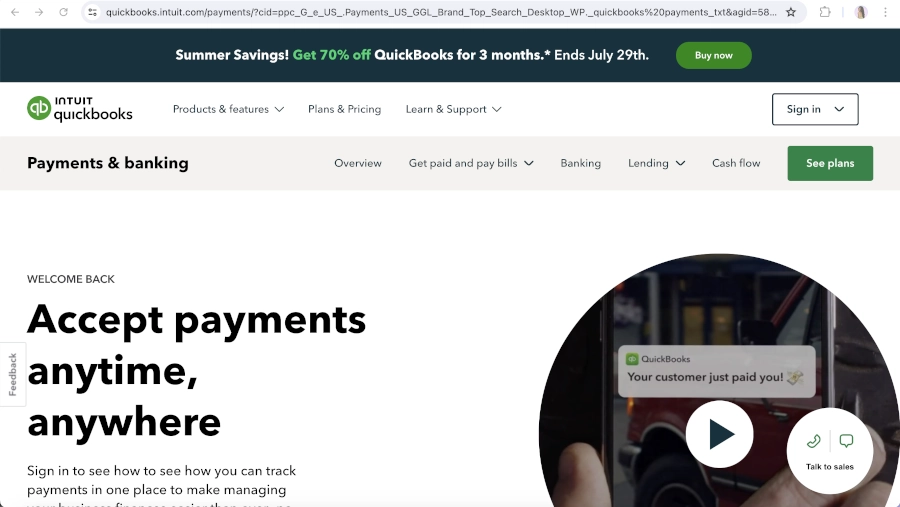
Screen Capture of Intuit Quickbooks Homepage
Quickbooks Payments Homepage

QuickBooks Payments, previously called Intuit Merchant Services, QuickBooks POS, and QuickBooks Merchant Services (QBMS), is a credit card processing option that comes with QuickBooks Online, a small business accounting software by Intuit. In recent years, Intuit has combined its different payment options into QuickBooks Online, along with a mobile card reader and app called GoPayment. We’ll dive deeper into each of these methods later in this review.

Products & Merchant Services

Payment Processing

QuickBooks Payments allows merchants to process credit cards directly through their QuickBooks Online account, which also helps automate the bookkeeping for these transactions. It supports all major credit and debit cards, as well as ACH transfers.

As of the latest update to this article, the company announced that starting from October 1st, 2024, through November, it will automatically pre-qualify all QuickBooks customers for payment processing. Customers will just need to complete a quick setup process to activate payments. It seems that QuickBooks is moving toward a payment model similar to Square and Stripe.

Online Payment Gateway

QuickBook quietly discontinued its payment gateway within the last couple of years. This means that if you operate a website and wish to integrate Quickbooks payment processing into your checkout process, you will need to utilize a third-party integration option. If you are starting a new ecommerce business, Quickbooks has partnered with Shopify for seamless payments and accounting integration.

Quickbooks POS

Intuit discontinued its desktop POS system in 2023 and partnered with Shopify to offer a point-of-sale system for businesses that require an all-in-one payment solution.

Invoice Payments

Quickbooks Online allows businesses to create and send invoices, estimates, and payment links directly to customers via email and text. Customers can pay using various methods, including credit/debit cards and ACH transfers.

Mobile Payments

Quickbooks offers direct integration of mobile payments via its “GoPayment” app and card reader. The app and reader are compatible with most smartphones and tablets running iOS and Android.

Person-to-Person Apps and Digital Wallets

QuickBooks Payments supports a variety of payment methods, including PayPal, Venmo, Apple Pay, credit/debit cards, and ACH payments.

Real-Time Tracking

QuickBooks Payments offers real-time tracking, allowing businesses to monitor when customers view and pay invoices.

Industry Scores & User Ratings

Online Ratings Summary
PaymentPop1
BBB Rating1.07
Google Maps2.3
GetApp Rating4.2
Our Rating3.0
Average Rating2.64

PaymentPop Rating for Quickbooks Payments

Negative Feedback

They are the worst. I just discovered that 4 credit cards I processed that they processed, no errors, and are marked paid on my side were not processed. According to them it was a “glitch” I don’t retain credit card information, and neither do they. They said I can reprocess the transaction. That doesn’t really work when you don’t have any of the information. I also had a client that said they were charged twice, so I reversed the charge, only to find out they weren’t charged, so I have no payment and 2 credit card processing fees. They are horrible. Do not use them.

Positive Feedback

There are no positive reviews published about Quickbooks Payments on the PaymentPop website.

QuickBooks Payments BBB Rating

QuickBooks Payments does not have its own Better Business Bureau (BBB) profile, but its parent company, Intuit, is not BBB accredited and holds a 1.07/5 star rating based on 583 customer reviews. Intuit has received a large volume of complaints, with 3,547 complaints closed in the past three years and 1,203 closed in the last 12 months. Common issues reported in reviews and complaints include problems with Intuit’s products and services, as well as challenges with customer support. Customers often express frustration with software glitches, billing disputes, and difficulties in receiving adequate help from customer service.

Negative Feedback

On multiple separate occasions I’ve been left stranded with no way to access money because of there service being down for multiple hours on end. It’s happened many times and there needs to be something done or some sort of regulation. There should be no reason one cannot access their money. It’s ridiculous.

0 Stars– Countless problems with their software and the absolute worst customer support I have ever experienced in my life.

Positive Feedback

There are no positive reviews published about Intuit Inc. on the BBB website.

Google Maps Rating for Quickbooks Payments

Quickbooks Payments has a 2.3 out of 5 star rating based on 6 user reviews on Google Maps.

Positive Feedback

Awesome 👍👍😊

Negative Feedback

This company lies and uses trickery to try to get people to use their online vs their desktop program. Don’t trust them ever! Whenever they want to make it right with me I will change this review.

GetApp Rating Analysis for QuickBooks Payments (Intuit GoPayment)

QuickBooks Payments, also known as Intuit GoPayment, has a 4.2/5 rating on GetApp, based on 66 customer reviews. The reviews are generally positive, with 38 reviews giving it a 5-star rating and 18 reviews rating it 4 stars. However, there are also some negative reviews, with 6 reviews giving it 1 star. Common themes among positive reviews include ease of use and integration with other software. Negative reviews often mention issues with software bugs, high charges for simple transactions, and poor customer support response.

Negative Feedback

Some bugs makes it boring, its charges amount is way much for such a simple software especially for common goods with fixed prices in small shops, poor customer support response team. – Review from Moses W.

I have to swipe the card 3x, hop on 1 foot then slide the card for it to work. Ridiculous and time consuming. – Review from Lindsey N.

Positive Feedback

This software is super easy to use and also user friendly. GoPayment can be integrated with other software thus giving it an added advantage over other payment software. – Review from Bryan W.

QuickBooks software is very affordable with a lot of good. There are lots of reports in which you can see that the app allows you to add on a variety of additional features. – Review from Garv S.

Source: GetApp

Processing Rates & Fees

Setup Costs

There is no setup fee to create a QuickBooks Payments account aside from the cost of a QuickBooks Online subscription. Additionally, there are no long-term service commitments or termination fees for canceling the credit card processing option.

QuickBooks Payments Transactions Rates

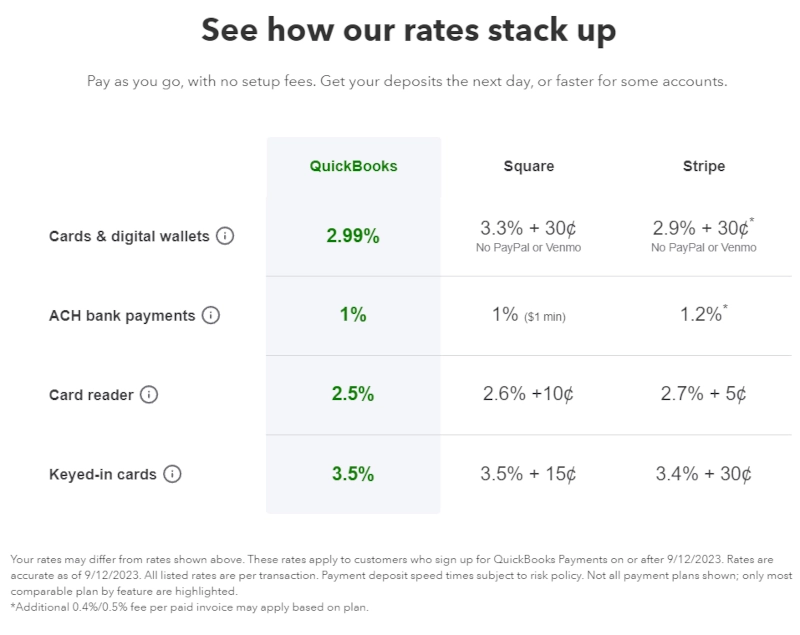
The company advertises transaction fees that are very attractive in comparison to services like Stripe and Square, but expensive as compared to the best credit card processors in the industry. QuickBooks includes a disclaimer with its quoted rates, stating that the actual pricing may differ from what is quoted, without providing any clear explanation for why a customer’s rates might vary. The disclaimer also notes that not all possible pricing plans are disclosed. Due to this lack of transparency around rates and fees, we have lowered the company’s score in this area.

screen capture of quickbooks promoting rates and fees
From the Quickbooks Payments website

Other Possible Fees

In addition to transaction fees, we have located complaints regarding incidental charges such as annual PCI Compliance fee, which appears to vary based on the estimated number of transactions per year: $35 for 1-24 transactions, $50 for 25-99 transactions, or $100 for 100+ transactions. Business owners are advised to thoroughly review and comprehend the pricing section of the merchant application before initiating an account setup.

Lawsuits & Legal History

Our research has indicated that no lawsuits or legal action has come to the company at the time of this review.

Employee Reviews & Sales Practices

Marketing Concerns

QuickBooks’ credit card processing option is primarily marketed through direct email and mail marketing, online advertising, and via the QuickBooks accounting software. Intuit doesn’t appear to use independent sales agents, but does have a reseller program that allows other sales organizations to market and sell its services. Other than promoting rate and fees that could be misleading, Quickbooks Payments appears to market its services in an ethical manner.

Employee Reviews

Employee reviews for Intuit are generally positive, with many highlighting the company’s strong work-life balance, excellent benefits, and supportive culture. Employees value the hybrid work options, competitive pay, and opportunities for professional development. Teams are often described as cohesive, innovative, and focused on collaboration and diversity. Many employees feel empowered and appreciate the flexibility to work from home.

However, some reviews mention concerns about middle management, citing issues like micromanagement and slow decision-making. Constructive feedback often calls for more transparency and stronger leadership, particularly in sales and customer support roles. Overall, the work environment is viewed as positive, though there are opportunities for improvement in management practices.

QuickBooks Payments Competitors

Compare QuickBooks Payments to competitors that earned top marks.

Bottom Line

QuickBooks Payments is a popular credit card processing solution for businesses that use QuickBooks accounting software. It integrates smoothly with the platform, making both payment processing and financial management easier. While its pricing is competitive with other user-friendly solutions, it may be more expensive compared to processors that specialize in industries like retail, restaurants, or healthcare. One key advantage is the lack of cancellation fees, which sets it apart from providers that require long-term contracts with early termination penalties—something we usually recommend business owners avoid.

Although QuickBooks Payments typically receives positive feedback, it’s important for business owners to fully understand the terms before signing up, as funding holds and account cancellations can occur if allowable conduct is breached. Comparing QuickBooks Payments with other processors that can integrate with Quickbooks Online may help businesses find the best fit for their specific needs. Additionally, training on QuickBooks features can enhance the overall experience, helping to minimize issues and optimize payment integration into daily operations.

Read Actual User Reviews

All user reviews have been moved to our partner, PaymentPop.com

Contact QuickBooks Payments

Contact & Customer Support
CEOSasan Goodarzi
Headquarters2700 Coast Ave, Mountain View, CA 94043
Toll-Free General Customer Support(800) 446-8848
Sales Inquiries(877) 683-3280
Additional Support ChannelsLive Chat
Websitequickbooks.intuit.com/payments