In this review of Cube, we will provide a detailed overview of the company's credit card processing services. We will cover the range of services they offer, including point-of-sale (POS) systems, mobile payment solutions, and e-commerce capabilities. The review will identify the types of businesses that might benefit from these services. Additionally, we will examine client and customer reviews to highlight common trends and potential concerns. The article will also address the company's pricing structure, contract terms, and specific features provided. By the end of this review, you will understand whether Cube meets your payment processing needs.
About Cube
Launched in late 2012, Cube is a cloud-based point-of-sale system with an attached merchant account. The service is intended to function as a more complete back and front-end solution for businesses than its mobile payments competitors like Square and GoPayment, but it does cover a lot of the same territory as these other popular services.
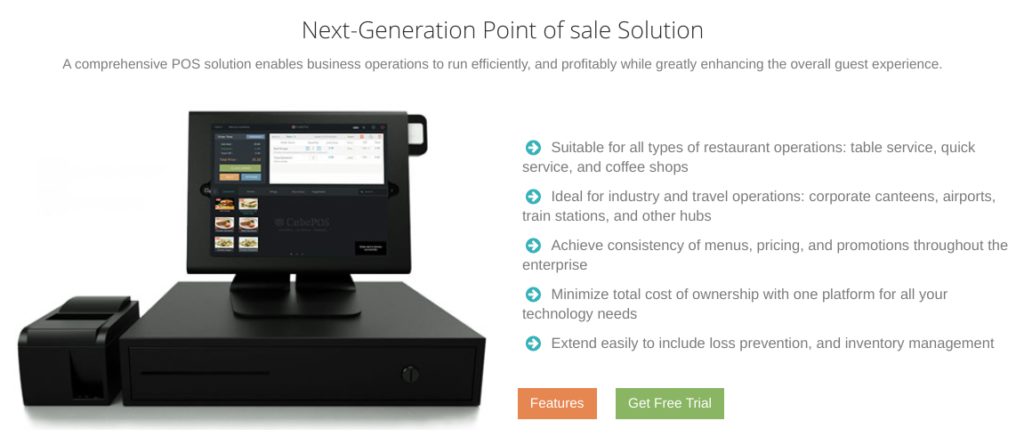
Cube provides wireless payment processing aimed at replacing traditional terminals and registers, operable through an iPad using a card reader and a free app. Currently, the app is not available for Android devices. Cube also offers back-end solutions, including inventory management, labor tracking, analytics and reporting, and synchronization across multiple locations. Additionally, Cube features a Kitchen Display System for order tracking and ticket syncing, beneficial for small service industry businesses with customizable settings like color coding, warning times, and audio cues.
Mobile Payment Solutions
Cube POS's mobile payment solutions facilitate on-the-go transactions, making it ideal for businesses operating outside traditional brick-and-mortar environments, such as pop-up stores, event vendors, or mobile services. This service enables businesses to process credit and debit card transactions directly from a mobile device, enhancing accessibility and convenience.
E-Commerce Services
Cube POS offers e-commerce services to help businesses meet the demands of online shopping. With a secure online payment gateway, Cube POS allows businesses to handle internet transactions efficiently and securely, providing a reliable solution for online purchases.
Virtual Terminal
Cube POS's virtual terminal service is particularly useful for businesses handling mail or telephone orders. This feature allows remote processing of credit card transactions by manually entering payment details into a secure online system, offering a flexible payment solution for remote operations.
Integrated Business Solutions
Beyond payment processing, Cube POS offers integrated software solutions to streamline business operations. This includes payment processing, inventory management, CRM, and data analysis, helping businesses to improve efficiency and effectiveness through a comprehensive suite of tools.
Cube makes its own point-of-sale devices and software
Cube Customer Reviews
Here's What Their Clients Say
Customer Reviews Summary
Total Online Complaints
<10
Live Customer Support
Yes
Most Common Complaint
N/A
Recent Lawsuits
No
Cube Reviews: User Experiences and Feedback
The Cube point-of-sale application has received positive feedback, securing nearly a five-star rating on the Apple App Store. Nevertheless, there have been mentions of software glitches and less-than-ideal customer support. As Cube is a newer entry to the market, the volume of reviews remains modest. To help future customers gain a better understanding of Cube’s offerings, we invite users to share their experiences with Cube in the comments section.
Legal and Regulatory Status of Cube POS
There are no recorded class-action lawsuits or Federal Trade Commission complaints against Cube POS to date. For clients facing unresolved issues, reporting their situation to relevant oversight bodies may provide a pathway to resolution without direct confrontation.
Customer Support Provided by Cube POS
Cube POS offers support through email and chat for its “Per Swipe” clientele, while “Enterprise” customers have the added benefit of dedicated phone support. This structured customer support model aims to cater to the varied needs of Cube’s diverse user base effectively.
Contact Information for Cube POS Customer Service
(800) 335-2449 – Toll-Free General Customer Service
(734) 335-0408 – Sales Inquiries
Additional Support Resources
Customer support form
Live Chat
The provision of live chat and phone support underscores Cube’s commitment to customer satisfaction and positions the company as a noteworthy contender in the competitive point-of-sale market sector. These support options facilitate prompt and effective communication for resolving client concerns and queries.
Cube does not currently have a profile with the Better Business Bureau. Given how new the company is, it is difficult to assign it an adjusted rating. We will therefore not take a BBB score into account when determining the company’s overall rating in this review.
Cube offers two separate pricing plans. The first, a “Per Swipe” plan, is a month-to-month agreement with no monthly fees, no termination fees, a 2.5% fee on swiped transactions, a 3.5% fee on keyed-in transactions, and an attached merchant account. Clients may not integrate their previous merchant account with this plan. This plan deducts 2.5% or 3.5% from each transaction before depositing it to the business’ bank account, resulting in a simpler process than end-of-month billing. The “Per Swipe” plan also includes a daily limit of $5,000 and a weekly limit of $30,000 for swiped transactions and a daily limit of $500 and a weekly limit of $3,000 for keyed-in transactions.
Cube also offers an “Enterprise Plan,” which is a custom pricing option for businesses that would like to retain their current merchant accounts. This plan appears to involve a monthly fee and includes variable per-transaction costs, but it also adds live support, multiple location support, customized hosting, and personalized setup. It also involves a business-specific processing limit established during setup. It should be noted that after signup, clients can upgrade from the “Per Swipe” plan to the “Enterprise Plan,” but they may not convert their service from the “Enterprise Plan” to the “Per Swipe” plan.
Rates Comparable to Square
Overall, these transaction rates, fees, and processing limits compare favorably to Square, but Cube is still a very new software that may not carry the same ease-of-use as its more established cloud-based competitors. The company does score points for its clear disclosure of processing limits and live customer support options, which many of its competitors lack. That said, we also encourage business owners to check out our list of the providers of thebest merchant services.
Cube appears to primarily market its services through its website. The company advertises its rates and fees plainly on its “Pricing” page, and we are unable to locate any Cube reviews that dispute these figures. Cube does list the terms of service associated with its merchant account on its website, so customers who would like to review these terms are able to do so before initiating the application process. In general, this compares favorably to our list ofbest credit card processors.
Our Cube Review Summary
Our Final Thoughts
Cube rates as a reliable and affordable credit card processing POS system according to all available information. Despite its relatively recent entry into the market, Cube has demonstrated significant potential to compete with established providers. The company’s cloud-based payment processing model is on par with industry standards, offering the flexibility and convenience that modern businesses require. This model allows for seamless transactions and real-time updates, which are critical for maintaining efficient operations.
In addition to its robust payment processing capabilities, Cube has the potential to deliver a comprehensive suite of point-of-sale and back-of-house services specifically designed for small businesses. These services are likely to include inventory management, sales tracking, and customer relationship management tools, all of which can help small business owners streamline their operations and improve their overall efficiency. As Cube continues to grow and expand its offerings, it is well-positioned to attract a loyal customer base and garner positive reviews. Its focus on affordability and reliability makes Cube a promising option for small businesses seeking a versatile and dependable POS system.
In the late 2000s, as a broke college student struggling to make ends meet, I was contacted by a merchant services company after uploading my resume to a job listings website. This company promised substantial commissions and ongoing residual income for simply persuading businesses to accept credit card payments. It seemed straightforward enough—after all, what business doesn’t need to process credit card payments? Following a phone interview with a persuasive “sales director,” I found myself embarking on what I believed would be an easy job that would significantly boost my bank account with reliable monthly income and large sales commissions. However, the lessons I learned would profoundly change my life in ways I could never have imagined.
After completing my sales training, I hit the ground running, eager to make sales. This broke college student was determined to improve his financial situation! My first attempt at a cold call, with no prior appointment, ended with a burly man in his 50s yelling at me to leave, claiming he had been “totally robbed” by someone like me before. As I hastily exited, puzzled and intimidated by his reaction, I couldn’t help but wonder what he meant. Throughout the day, I encountered similar hostility from other business owners, all expressing disdain for the industry I had been so excited to join that morning. Confused and curious, I decided to shift my approach from selling to listening.
I quickly uncovered that the merchant services sector was riddled with unethical practices, including hidden fees, deceptive marketing, fine-print traps, and much more. It dawned on me that I had nearly been tricked by a dubious company into selling overpriced services under contracts with long-term commitments, all without being fully aware of what I was promoting. Outraged, I resigned from that company but learned that there were indeed ethical credit card processing companies that treated their clients fairly. Over the next four years, I worked for one such company, assisting hundreds of businesses in securing cost-effective processing solutions. Yet, I also met many more who had been misled and trapped in onerous service agreements. Determined to help people steer clear of these unscrupulous providers, I launched this website in my spare time, dedicating myself to researching and sharing my findings on every merchant account provider I could investigate.
Gradually, more and more business owners began to discover my articles. As word spread, search engines started to rank my content highly, amplifying its reach. My efforts were making a difference! Eventually, the website garnered enough traffic to enable me to leave my job and focus on it full-time, a journey that has now spanned over a decade. This path has not been without its challenges; unscrupulous company owners have tried to intimidate and sue me into silence on several occasions. Yet, I have stood firm against each threat. Here I am, continuing to publish reviews and articles, hoping to safeguard others from the pitfalls of the credit card processing industry.
If you believe in my mission and wish to contribute, please share my articles on your websites and social media. Thank you for visiting!
Testimonials & Complaints
How Did Cube Treat You?
1 User Reviews
Henry Margaret
I can’t say enough good things about Cube – they’ve completely transformed the way we handle project management in our company. As a team leader, I was constantly struggling to keep everyone on the same page and ensure tasks were getting done efficiently. That’s when we discovered Cube, and it’s been a game-changer!
First off, their user interface is incredibly intuitive. Even our less tech-savvy team members found it easy to navigate. Within minutes, we were all up to speed and ready to dive into our projects. The drag-and-drop feature for task assignments is just brilliant – it makes delegation a breeze!
Cube’s collaboration tools are what truly impressed us. Now, we don’t have to rely on lengthy email chains or messy spreadsheets. The real-time updates and comment threads keep everyone in sync. We can see the progress of each task, share ideas, and discuss changes instantly. It’s like having a virtual meeting room at our fingertips!
One of the biggest advantages of Cube is its flexibility. Our projects come in all shapes and sizes, and Cube adapts seamlessly to our needs. Whether it’s a quick sprint or a long-term development project, we can customize our workflows and set up deadlines that work for us.
And let’s talk about deadlines – Cube’s automated reminders have saved us countless times. No more slipping through the cracks or missing important milestones. The notifications keep us accountable and ensure we’re always meeting our goals.
Cube’s reporting features are another highlight. It’s so satisfying to see the progress we’ve made visually represented in charts and graphs. These insights help us analyze our performance, identify areas for improvement, and celebrate our successes.
The support team at Cube is fantastic too. Anytime we had questions or needed assistance, they were quick to respond and super helpful. It’s refreshing to work with a company that genuinely cares about its customers.
All in all, Cube has elevated our project management to a whole new level. We’re more organized, productive, and cohesive as a team. If you’re looking for a user-friendly, versatile, and effective project management tool, I wholeheartedly recommend giving Cube a try. You won’t be disappointed!
Sharing your experience influences our rating and helps other business owners make informed decisions. Promotional content and contact information will not be published. Please provide a detailed summary of your experience.
Any unauthorized copying and reproduction of the content of this page, including all meta data and computer code, is strictly prohibited. While the information in the above article is believed to be accurate as of its publish date, the author and publisher make no representation or warranties with respect to the accuracy, applicability, fitness, or completeness of the contents. The author and publisher shall in no event be held liable to any party for any direct, indirect, punitive, special, incidental or other consequential damages arising directly or indirectly from any use of this material, which is provided “as is,” and without warranties. Any and all use of trade names and/or marks are for identification purposes only and shall not be construed as a claim of affiliation, or otherwise, with CardPaymentOptions.com, Inc. ("CPO") in any form. The sole purpose of the material presented herein is to alert, educate, and inform readers. It is not intended as legal or financial advice. We may earn revenue if you obtain services from a provider that we recommend. See this page to learn how we support our operations.






Henry Margaret
I can’t say enough good things about Cube – they’ve completely transformed the way we handle project management in our company. As a team leader, I was constantly struggling to keep everyone on the same page and ensure tasks were getting done efficiently. That’s when we discovered Cube, and it’s been a game-changer!
First off, their user interface is incredibly intuitive. Even our less tech-savvy team members found it easy to navigate. Within minutes, we were all up to speed and ready to dive into our projects. The drag-and-drop feature for task assignments is just brilliant – it makes delegation a breeze!
Cube’s collaboration tools are what truly impressed us. Now, we don’t have to rely on lengthy email chains or messy spreadsheets. The real-time updates and comment threads keep everyone in sync. We can see the progress of each task, share ideas, and discuss changes instantly. It’s like having a virtual meeting room at our fingertips!
One of the biggest advantages of Cube is its flexibility. Our projects come in all shapes and sizes, and Cube adapts seamlessly to our needs. Whether it’s a quick sprint or a long-term development project, we can customize our workflows and set up deadlines that work for us.
And let’s talk about deadlines – Cube’s automated reminders have saved us countless times. No more slipping through the cracks or missing important milestones. The notifications keep us accountable and ensure we’re always meeting our goals.
Cube’s reporting features are another highlight. It’s so satisfying to see the progress we’ve made visually represented in charts and graphs. These insights help us analyze our performance, identify areas for improvement, and celebrate our successes.
The support team at Cube is fantastic too. Anytime we had questions or needed assistance, they were quick to respond and super helpful. It’s refreshing to work with a company that genuinely cares about its customers.
All in all, Cube has elevated our project management to a whole new level. We’re more organized, productive, and cohesive as a team. If you’re looking for a user-friendly, versatile, and effective project management tool, I wholeheartedly recommend giving Cube a try. You won’t be disappointed!